
Geography (viv.geo)
The Bixby viv.geo library capsule provides a set of concepts and actions that allow your capsule to handle a variety of location-based expressions for training and processing. This includes handling points, geometry regions and shapes, and named localities such as cities, countries, and landmarks.
This reference lists out several of the models available in this library capsule. Some sections contain tables listing information about those concepts or actions.
Models
The viv.geo capsule includes around 100 concepts covering geographical and locality information, as well as a general SearchTerm concept for training purposes. For more information on SearchTerm, read Using SearchTerm.
This is not an exhaustive list, but covers the more common models you might use.
Administrative Divisions
An administrative division is any politically distinct region recognized by international mapping authorities and used in geocoding.
Administrative divisions have country-specific meanings. (See Wikipedia's List of administrative divisions by country.)
The following are the available administrative divisions in the geo library:
CountryDivision
| Property | Type | Kind | Notes |
|---|---|---|---|
| name | CountryDivisionName | name | Required |
| type | AdministrativeDivisionTypeName | name | |
| countryCode2 | ISOCountryCode2 | name | |
| countryCode3 | ISOCountryCode3 | name |
ISOCountryCode2 is the two-character ISO identifier for the country; ISOCountryCode3 is the three-character ISO identifier for the country.
LevelOneDivision
This represents a first-level administrative division, such as a state in the United States, a province in Canada or Korea, and so on.
| Property | Type | Kind | Notes |
|---|---|---|---|
| name | LevelOneDivisionName | name | Required |
| type | AdministrativeDivisionTypeName | name | |
| countryCode2 | ISOCountryCode2 | name | |
| countryCode3 | ISOCountryCode3 | name | |
| subdivisionCode | ISOSubdivisionCode | name | |
| country | CountryDivision | structure |
LevelTwoDivision
This represents a second-level administrative division, such as a county or province.
| Property | Type | Kind | Notes |
|---|---|---|---|
| name | LevelTwoDivisionName | name | Required |
| centroid | GeoPoint | structure | |
| country | CountryDivision | structure | |
| levelOne | LevelOneDivision | structure |
LevelThreeDivision
This represents a third-level administrative division.
| Property | Type | Kind | Notes |
|---|---|---|---|
| name | LevelThreeDivisionName | name | Required |
| country | CountryDivision | structure | |
| levelOne | LevelOneDivision | structure | |
| levelTwo | LevelTwoDivision | structure |
LevelFourDivision
This represents a fourth-level administrative division.
| Property | Type | Kind | Notes |
|---|---|---|---|
| name | LevelFourDivisionName | name | Required |
| country | CountryDivision | structure | |
| levelOne | LevelOneDivision | structure | |
| levelTwo | LevelTwoDivision | structure | |
| levelThree | LevelThreeDivision | structure |
Points
Points represent specific geographic areas.
GeoPointpoints to a specific latitude and longitude.CurrentLocationpoints to a user's current location.NamedPointis aGeoPointwith a name and address.
GeoPoint
A GeoPoint is a specific point on Earth specified by a latitude and longitude.
| Property | Type | Kind | Notes |
|---|---|---|---|
| latitude | Latitude | decimal | Required |
| longitude | Longitude | decimal | Required |
| currentDistance | CurrentDistance | structure | lazy-sourced |
| reverseGeo | GeocodedAddress | see below | lazy-sourced |
| timeZone | time.TimeZoneId | text | lazy-sourced |
| populationDensity | PopulationDensity | structure | lazy-sourced |
| userFriendlyName | PlaceName | name |
- Calculated fields in
GeoPointare lazily sourced when accessed. currentDistanceis theDistancefrom the user's current location to theGeoPoint.- Accessing
reverseGeoperforms a reverse address lookup for theGeoPoint. TheGeocodedAddressconcept returned extendsAddress; its fields are identical, although thecentroidproperty is not lazily sourced.
CurrentLocation
This structure extends GeoPoint to be a special case for storing the user's current location. CurrentLocation is marked as transient. The viv.geo capsule includes an instantiation strategy that will set the value of CurrentLocation based on $user.currentLocation.
Your capsule will need to request the device-location-access permission to be able to access the user's CurrentLocation. For more information, read the Grant Capsule Permissions topic.
NamedPoint
A GeoPoint with a name and an address. If you have trained your capsule to take SearchTerm inputs, you will need to provide actions that take NamedPoint concepts as inputs. See Using SearchTerm for more details.
| Property | Type | Kind | Notes |
|---|---|---|---|
| name | PlaceName | text | |
| point | GeoPoint | structure | Required |
| address | Address | structure | See below |
| unstructuredAddress | UnstructuredAddress | text | |
| placeID | PlaceID | text | Here Maps reference ID |
| placeCategory | PlaceCategory | text | Here Maps category |
| bbox | viv.core.Decimal | decimal | See below |
When first accessed, NamedPoint will return values for address, unstructuredAddress (which can be any partial text that would match the address if used as a SearchTerm), placeCategory, and placeID.
The bbox property describes a rectangular bounding box, four decimal values in the following order: west longitude, south latitude, east longitude, north latitude. When a NamedPoint is generated from a SearchTerm, the bbox will be populated if the search term describes an area, such as a city, state, or country, rather than a point of interest.
Address
| Property | Type | Kind | Notes |
|---|---|---|---|
| centroid | GeoPoint | structure | lazy-source |
| locality | Locality | structure | |
| country | CountryDivision | text | |
| levelOne | LevelOneDivision | text | |
| levelTwo | LevelTwoDivisionName | text | |
| levelThree | LevelThreeDivisionName | text | |
| levelFour | LevelFourDivisionName | text | |
| subLocalityOne | SubLocalityOneName | structure | |
| subLocalityTwo | SubLocalityTwoName | structure | |
| subLocalityThree | SubLocalityThreeName | structure | |
| subLocalityFour | SubLocalityFourName | structure | |
| postalCode | PostalCode | text | |
| streetAddress | StreetAddress | text | |
| streetAddress2 | StreetAddress2 | text |
centroid in Address is lazily sourced when there is sufficient information in other properties to determine a specific GeoPoint.
UnresolvedAddress
The UnresolvedAddress model is similar to Address, but does not contain a centroid property.
| Property | Type | Kind | Notes |
|---|---|---|---|
| streetAddress | StreetAddress | text | |
| streetAddress2 | StreetAddress2 | text | |
| locality | Locality | structure | |
| country | CountryDivision | text | |
| levelOne | LevelOneDivision | text | |
| levelTwo | LevelTwoDivisionName | text | |
| levelThree | LevelThreeDivisionName | text | |
| levelFour | LevelFourDivisionName | text | |
| postalCode | PostalCode | text |
Locality
A city or town within a geographic region.
| Property | Type | Kind | Notes |
|---|---|---|---|
| name | LocalityName | name | Required |
| centroid | GeoPoint | structure | |
| type | AdministrativeDivisionTypeName | name | |
| country | CountryDivision | structure | |
| levelOne | LevelOneDivision | structure | |
| levelTwo | LevelTwoDivision | structure | |
| levelThree | LevelThreeDivision | structure | |
| levelFour | LevelFourDivision | structure | |
| localityClass | LocalityClass | enum |
LocalityClass has the following possible symbols:
CountryCapitalLevelOneCapitalLevelTwoCapitalLevelThreeCapitalLevelFourCapital
Neighborhood
A neighborhood in a city, such as "Mission District" (in San Francisco) or "West End" (in London).
| Property | Type | Kind | Notes |
|---|---|---|---|
| name | NeighborhoodName | name | Required |
| centroid | GeoPoint | structure |
Place
A landmark or a business. The phrases "SJC" (an airport code), "Santana Row" (a shopping mall), "Golden Gate Bridge" (a landmark), and "french laundry" (a restaurant) could all be tagged as PlaceName.
| Property | Type | Kind | Notes |
|---|---|---|---|
| name | PlaceName | name | Required |
| centroid | GeoPoint | structure |
Distance
| Property | Type | Kind | Notes |
|---|---|---|---|
| magnitude | DistanceMagnitude | decimal | Required |
| unit | DistanceUnit | enum | Required |
Possible symbols for DistanceUnit are as follows:
- Millimeters
- Centimeters
- Inches
- Feet
- Yards
- Meters
- Kilometers
- Miles
Do not train on the Distance structure concept, but instead train on the two primitives separately. An utterance such as "find restaurants in a 2 mile radius" would tag 2 as DistanceMagnitude and mile as DistanceUnit. (However, if the utterance can be applied more generally, consider using SearchTerm instead.)
PopulationDensity
This will be lazily sourced (computed for your capsule) when accessed.
| Property | Type | Kind | Notes |
|---|---|---|---|
| density | Density | decimal | Required |
| type | DensityType | enum | Required |
Possible symbols for DensityType are as follows:
- ultra-dense
- metropolitan-dense
- metropolitan
- suburban-dense
- suburban
- rural
- remote
- unknown
SearchRegion
A SearchRegion is similar to a NamedPoint, but contains different properties, including a shape property and more complex geographical divisions. If you have trained your capsule on SearchTerm values, you can provide actions that take either NamedPoint or SearchRegion concepts. If you have trained on named points or divisions, you will need to provide actions that take SearchRegion concepts as inputs.
See Using SearchRegion for more details.
| Property | Type | Kind | Notes |
|---|---|---|---|
| searchType | SearchType | enum | Required |
| streetAddress | StreetAddress | text | |
| postalLocation | PostalLocation | text | |
| country | CountryDivision | text | |
| levelOne | LevelOneDivision | text | |
| levelTwo | LevelTwoDivision | text | |
| levelThree | LevelThreeDivision | text | |
| levelFour | LevelFourDivision | text | |
| locality | Locality | structure | |
| subLocalityOne | SubLocalityOne | structure | (1) |
| subLocalityTwo | SubLocalityTwo | structure | |
| subLocalityThree | SubLocalityThree | structure | |
| subLocalityFour | SubLocalityFour | structure | |
| localityClass | LocalityClass | enum | |
| pointRadius | PointRadius | structure | |
| shape | GeometryWKT | text | (2) |
| bbox | viv.core.Decimal | decimal | See below |
A
subLocality*is a civil administrative division below theLocalitylevel; these are country/region-specific. AsubLocality*contains the same properties as aLocality, with the exception oflocalityClass.This is a "well-known text" string representing a vector geometry.
Possible symbols for SearchType are as follows:
- Country
- LevelOne
- LevelTwo
- LevelThree
- LevelFour
- Locality
- SubLocalityOne
- SubLocalityTwo
- SubLocalityThree
- SublocalityFour
- PostalLocation
- PointRadius
SearchRadius
When you use SearchTerm to create a SearchRegion, you can use SearchRadius to specify a default radius for the created region if the SearchTerm result does not specify its own radius. In other words, if the SearchTerm resolves to the city San Jose, the created SearchRegion will have a radius that encompasses San Jose, and that radius cannot be modified. If the SearchTerm resolves to an address that does not have a radius, then the created SearchRegion will have a radius of 10 miles by default, but this can be overridden by specifying a new SearchRadius for that SearchRegion.
This can be used, for example, with the on-empty effect to define a larger radius for a search. This example comes from the Earthquake Finder sample capsule on GitHub:
action (FindEarthquakes) {
  description (Search for earthquakes based on different input parameters)
  type (Search)
  ...
  output (Earthquake) {
    on-empty {
      if (exists(searchRegion.searchType) && searchRegion.searchType == 'PointRadius') {
        replace (searchRegion) {
          if (exists(searchRegion.pointRadius)) {
            intent {
              goal  {geo.SearchRegion}
              value { geo.GeoPoint$expr (searchRegion.pointRadius.centroid) }
              value {
                geo.SearchRadius {
                  unit: geo.DistanceUnit$expr (searchRegion.pointRadius.radius.unit)
                  magnitude { geo.DistanceMagnitude(25) }
                }
              }
            }
          }
        }
      }
    }
  }
}
Training
The viv.geo capsule includes actions that will use the concepts above such as SearchTerm or Locality as inputs and output more concrete concepts that the actions in your capsule can act on. These actions will guide Bixby in resolving ambiguities such as distinguishing between similarly-named cities, or searching in a specific area to provide your capsule a list of businesses. This lets Bixby do a lot of the work for you: you can train on SearchTerm and provide actions that take NamedPoint concepts as inputs.
Using SearchTerm
The SearchTerm concept allows your capsule to easily search on a variety of geographic types. Utterances such as "SFO", "60 South Market Street", "Mountain View" and "Golden Gate Bridge" can all be trained with SearchTerm.
Your capsule does not have to handle the search action, but instead just needs one or more action that takes a NamedPoint or a SearchRegion as an input. Data from Here Maps will be used by viv.geo to resolve the SearchTerm into a specific NamedPoint.
As an example, a ride sharing capsule might have SourcePoint and DestinationPoint models that are given roles-of NamedPoint. Its FindRideShare then includes those as its inputs:
action (FindRideShare) {
  description (Finds a ride from source point to destination point.)
  type (Constructor)
  collect {
    input (sourcePoint) {
      type (SourcePoint)
      min (Required) max (One)
      default-init {
        // Note: To enable current location access, in your capsule.bxb:
        // import viv.location and viv.self in capsule-imports
        // add 'library-permission (self:profile)' to permissions
        intent {
          goal: SourcePoint
          route: geo.CurrentLocation
        }
      }
    }
    input (destinationPoint) {
      type (DestinationPoint)
      min (Required) max (One)
      default-select {
        with-rule {
          select-first
        }
      }
    }
  }
  output (RideShare)
}

This action enables selection learning, along with a fallback selection rule of select-first to default to the first returned option. The ridesharing capsule would then have an endpoint that includes the points as its inputs:
endpoints {

  action-endpoints {
    action-endpoint (FindRideShare) {
      accepted-inputs (sourcePoint, destinationPoint)
      local-endpoint (FindRideShare.js)
    }
  }
}
In addition to using NamedPoint concepts as inputs, your actions can also used SearchRegion concepts as inputs when training on SearchTerm values. The viv.geo library will build a SearchRegion from the SearchTerm input. See Using SearchRegion, below, for details.
You can learn more about location searching by studying the Location Search sample capsule.
Autosuggest
You can search named points (and contacts) using viv.location.Autosuggest, which takes a SearchTerm as its input. Read the viv.location documentation for more information.
Using AutoCompleteSearchTerm
The viv.geo capsule provides an AutoCompleteSearchTerm concept and a matching AutoCompleteSearch action for use with the auto-complete input view component. AutoCompleteSearchTerm has similar scope and functionality to SearchTerm, allowing searching on a variety of geographic types such as "SFO", "60 South Market Street", "Mountain View" and "Golden Gate Bridge". Using AutoCompleteSearchTerm allows Bixby to suggest completion results as the user types.
To use these functions, your auto-complete view should define an intent with the AutoCompleteSearch action as its goal and AutoCompleteSearchTerm as its value.
You should not use AutoCompleteSearchTerm for NL training. Use SearchTerm instead.
Using SearchRegion
Your actions can take SearchRegion concepts as inputs. These concepts can be created by training on SearchTerm, or by training on named points or divisions.
When possible, you should train on SearchTerm for the most flexibility in handling user utterances. Only train on other viv.geo concepts if you need to specifically restrict utterances to those concepts. Your actions can use SearchRegion as inputs and still train on SearchTerm.
If your capsule does need to train on concepts for named points and divisions, you should train on the *Name primitive concepts, not on the structure concepts. For reference, the matching primitives to the structure concepts listed previously are as follows:
CountryDivisionNameLevelOneDivisionNameLevelTwoDivisionNameLevelThreeDivisionNameLevelFourDivisionNameLocalityNameNeighborhoodNamePlaceNamePostalCodeStreetAddress
If you have trained on named points or divisions, you should provide actions that take SearchRegion concepts as inputs. A hypothetical FindBusiness action might include the following:
action (FindBusiness) {
  type (Search)
  description (An action that finds businesses matching some search criteria)
  collect {
    input (searchRegion) {
      type (geo.SearchRegion)
      min (Required) max (One)
      default-select {
        with-learning
        with-rule {
          select-first
        }
      }
    }
    // ... other inputs to collect ...
  }
  output (Business) {
  }
}
This action enables selection learning, along with a fallback selection rule of select-first to default to the first returned option. The JavaScript action implementation should accept SearchRegion as one of its inputs.
As many of the properties of SearchRegion will be populated by Bixby as possible based on the available data. For instance, if you trained your capsule on Locality, and the utterance value was "San Jose, CA", the returned SearchRegion would have a SearchType set to Locality; the pointRadius would approximate the size of San Jose; divisions would be filled in with appropriate values.
If there is no region-specific size returned for the pointRadius, the SearchRegion will be created with a default radius of 10 miles. To override this radius, you can set the SearchRadius property of the region.
If you train on terms that correspond to regions, such as LocalityName or NeighborhoodName, Bixby will only search for matches to your specified training fields within that region. For instance, if you've trained on NeighborhoodName, searching on "mission district" when the user is in San Francisco will find San Francisco's Mission District, but not if the user is in San Jose. If you've trained on a concept that corresponds to a specific point such a StreetAddress or a PlaceName, the search radius is applied after the location is found.
SearchRegion and CurrentLocation
It's possible to use SearchRegion to initiate a search based on the user's current location. To do this, tag a training example using a phrase like "nearby" or "around me" with a route of geo.CurrentLocation.
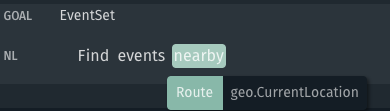
This will result in a SearchRegion populated with the following fields corresponding to the user's current location:
LocalityLevelOneDivisionCountryDivisionpointRadius
The pointRadius will be centered on the user's exact location. By default, this radius will be 10 miles.
Video Tutorial: Geo Library Quickstart
The following video shows how to handle locations with the geo library capsule.